Course Check and warnings
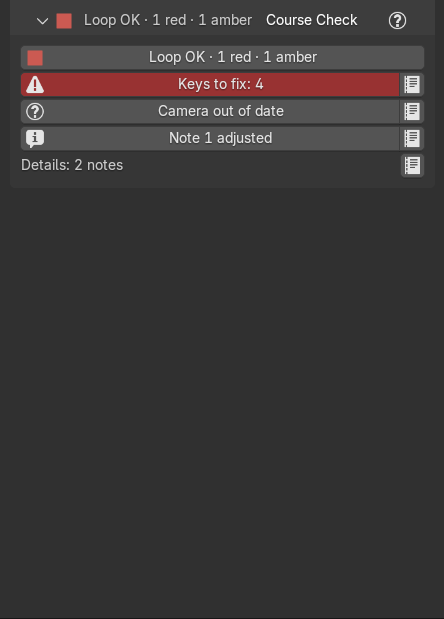
Marble Studio checks its own work after every Generate, edit, and re-solve. Everything it finds that you may need to act on is listed in one place: the Course Check section, the last section of the Marble Studio tab. The other sections keep only their controls, so nothing above Course Check grows or moves while you work.
This page explains how to read Course Check and lists its rows by subject. Numbers and names in the quotes (frames, key names, millimeters) are examples; yours will differ.
Reading Course Check
Course Check is folded by default and never opens by itself. Open it when the light in the header asks you to.
- The status line at the top is also the Check button: press it to run every check now. It reads, for example, "Loop OK · 0 red · 0 yellow", shortened to "0 red · 0 yellow" or "0 · 0" when the sidebar is narrow. Before the first check after a file opens it reads "Not checked — Check". The report says "Course Check: 0 red, 0 yellow."
- One row per finding, listed live as you work. Each row is its title as a colored button, plus a page
icon:
- Red: a hard rule is broken (the marble passes through a key, a strike is off its frame) or the loop is open. Red rows stay until the cause is gone and cannot be hidden ("A red row cannot be hidden: it goes when its check passes.").
- Yellow: a caution. The course still loops, but look at it.
- Info: a plain fact, such as what an edit just moved.
- Click a row's title to go to the cause: it selects the key or object the row names, moves the playhead to the frame where the fault is, leaves local view, and switches the view to the camera, so you see the fault as it renders ("Selected Key.041, frame 540."). When it can't turn a view, the report adds why, for example "Selected Key.041, frame 540 (camera view: no 3D view to turn)." A row that names nothing opens its details instead.
- Click the page icon for the details (Course Check Details): the full sentence, a Go To button, and Hide for a yellow or info row ("Hidden: Ripple moved keys (it comes back if it changes)."). A hidden row comes back by itself if what it measures changes. If the row went away meanwhile: "Already fixed: this row is gone." (from the title or Hide: "Already fixed: that row is gone."). A row whose target is a button runs it; if that cannot run, it says "Could not run mms.build_camera: ...".
- Rows that name several keys have pages. The details show "2 / 5" beside the title, with arrows either side of Go To: one page per key, each with its own sentence and its own Go To.
- Details: 3 notes at the bottom lists plain facts that are always true of the course. Its page icon opens
them:
- where the loop starts, for example "The loop starts at its first frame (61): the render already is the loop, nothing to reorder.";
- how the loop length was decided (the generator line), for example "Loop 1.50 s, where the song repeats: 1.20 s to the end of bar 32 + 0.30 s before note 1." (or "... 1.20 s to End of Track at bar 32 + ...", with "(4/4 assumed: no time signature)" or "(End of Track ignored: 2.0 s after the song)" at the end when they apply), "Song repeats 1.50 s after its last note; the loop keeps 1.00 s; the closing never starts sooner than the last two notes' spacing.", "Song repeats 1.50 s after its last note; the loop keeps 1.00 s, the closing named on the generator line; the closing never starts sooner than the last two notes' spacing.", "Song wants 1.50 s (1.20 s to the end of bar 32 + 0.30 s before note 1); loop is 1.00 s, the longest the search found with note 1 at Bounce 0.35 or more (Bounce 0.36). ...", "Song wants 1.50 s (1.20 s to the end of bar 32 + 0.30 s before note 1); loop is 1.00 s: no longer loop the search tried kept note 1 at Bounce 0.35 or more (Bounce 0.31). ...", "Song wants 1.50 s; loop is 1.00 s (note 1 Bounce 0.40). ...", "Song wants 1.50 s; loop is 1.60 s (note 1 Bounce 0.40): the Loop Nudge (+6) asks for it, but the loop closes cleanly only at 1.60 s." (in Pro "... only at 1.60 s; a seam track can take the rest."), "Song wants 1.50 s; loop is 1.60 s, 6 frames past it.", or "Song length unknown: unreadable." (or with the reason, "Song length unknown: not a MIDI file.", "... unknown status byte 0xF4.", "... running status with no status byte.");
- what would bridge a long rest: "The rest is longer than a bounce: the Loop Nudge cannot reach it (needs +700; limit -600 to +600).", "The rest is longer than a bounce: Loop Nudge +40, but note 1 would bounce below 0.35." or, in Marble Studio Pro, "The rest is longer than a bounce: a seam track, or Loop Nudge +40 (note 1 would bounce below 0.35)."
- Every row's full text is also written to a Blender text block named MMS Course Check, which you can open in a Text Editor. It starts "Marble Studio - Course Check" and "As of the last check (every settle, Generate, Re-solve and Check). Red: a hard rule broken or the loop open. Yellow: a caution that still loops. Info: a plain fact.", then one line per row, for example "- [Course] Keys to fix: ...". The page icon's tooltip points there: "Read this row in full, item by item (the whole list is also in the "MMS Course Check" text)".
- Rows with a fix button. Three rows carry a button beside Go To that fixes the cause in one press: Key top off strike (Fix Contact Height), Range not one loop (Restore Loop Range), and Old track geometry (Update).
- Go To with nothing to select says "This row names nothing to select." or "This page names nothing to select."; a page that went away meanwhile, "Already fixed: that page is gone."
When a row goes away, its line stays blank until your next Generate, Re-solve, or Check press, so the panel does not jump under your mouse.
The header light
The Marble Studio header at the top of the tab, and Course Check's own header, always show a traffic-light icon and the red and yellow counts, for example "2 · 0" (two red, no yellow), even with every section folded. Before the first check after opening a file the counts are the ones saved with the file, marked "?".
Rows by subject
Rows are grouped by what they are about. Rows marked Pro only appear in Marble Studio Pro.
Generate report
Generate and Next Seed also report in the status bar. These lines are not rows:
- "No 'my_song' audio (.wav, .mp3 or .flac) beside the MIDI - skipped the audio import." Not a problem: the course is built without audio. Use Import Audio (WAV) if you want it. If the file had the previous song's audio, it is removed and the Audio removed row says "No audio found beside my_song; the previous song's audio was removed."
- "Course check: clean (8 keys)." or "Course check: 2 keys need you - key 41 passes through its own key · key 42 touches its own base", the same findings as Keys to fix below. A key can also be named as one that "overlaps another key" or "overlaps a seam echo", and the closing flight as "the closing flight off key 24" or "the loop closure".
- "(N keys hit the placement fallback - may clip.)" For these keys no clean spot was found, so the best one was used. Play them; if the marble touches a key, it shows in Keys to fix below.
- "(Opening run-up cannot clear the first keys - lengthen lead-in / reshape note 1.)" See Run-up clips keys below.
Refusals (nothing was changed):
- "Choose a frame rate above first." See Frame rate.
- "The scene is at 24 fps but you chose 30. Choose again above."
- "Need at least 2 notes.", "No note tracks in MIDI.", "MIDI parse failed: ...". The file is too short or not a MIDI Marble Studio can read. The reason after "MIDI parse failed:" is one of "not a MIDI file (missing MThd header)", "invalid MIDI header length", "unsupported MIDI format 2 (independent sequences)" (or "unsupported MIDI format 3"), "unsupported SMPTE time division (PPQ only)", "invalid MIDI time division (0)", "unsupported MIDI time division", "truncated MIDI file (variable-length value)", "truncated MIDI track (missing event)", "truncated MIDI meta event", "truncated MIDI meta payload", "malformed MIDI Set-Tempo payload", "truncated MIDI sysex payload", "MIDI running status with no prior status byte", "truncated MIDI channel event", or "unknown MIDI status byte 0xF4". Export the MIDI again from your music program.
- "This file's marble is 'Marble' (Setup > Marble) but its template keys (Key.* + Key Base* pairs) are not in the file. Clear the Marble field in Setup to build from the add-on's own pieces." See Marble.
- "The add-on's built-in course pieces could not be prepared; nothing was changed." Reinstall the add-on.
- "The MIDI this course came from is not at ... - use Generate Course from MIDI." (Next Seed) The MIDI moved.
Loop
- Frame rate changed (yellow): "Scene frame rate is 24 fps but this course was made at 60 fps. Nothing was re-solved. Set Output > Frame Rate back to 60 to keep editing." Every strike sits on a frame of the original rate, so nothing is re-solved until you put it back. See Frame rate.
- The Loop row says where the loop note sits after the last Loop Nudge:
- Landed +12 (info), Landing +12... (info, "Landing +12... (settling): the course lands when the slider is released."), Re-solve to land (info, "The slider asks +12; the course still sits at +0 because nothing re-solves right now (Live Update is off, or the frame rate does not match the course). Press Re-solve Course, or turn Live Update on, to land it."), Asks +12, sits +0 (info, "The slider asks +12; the course sits at +0. Move the slider or press Re-solve Course to land.", or "The slider asks +12; the course sits at +0. Press Re-solve Course to land (Live Update is off, or the frame rate does not match the course)."; older files: "Nudge asks +12, course sits at +0: drag the slider to re-land."), and the kept and Sits rows;
- Cannot land +50 (red): the nudge cannot land; the sentence says why, the nearest value that lands, and where the course stays. The row goes when the slider asks for something that lands or the thing it names is gone. Every wording is on When the nudge cannot land.
- Loop cannot close (red) or Loop close note (info): what the closing flight could or could not do.
- A course made before typed keys were tracked adds a note: "This course was made before typed keys were tracked, so the Loop Nudge may re-angle the keys after note 1."
- Note 1 adjusted (info): what was changed at note 1, the first key. Click to select it.
- Seam relax capped (yellow): "Seam relaxation hit its pass cap - check the loop". Play across the seam; if it jumps, re-solve or undo the last edit.
- Gap at its floor (info): "The closing gap is already as short as it goes - nudging further earlier changes nothing."
- More MIDI parts and Parts not played (info): the MIDI has other parts, and which ones the marble does not play. See Track Selection.
Frame range and loop start
- Range not one loop (red): "Frame range 1..1270 is not one loop (the loop is 61..1270): the render will not loop." The frame range was changed by hand. Press Restore Loop Range, the button beside Go To on this row (also in Render Loop).
- Frame range set (info): "Loop length changed 1210 -> 1214 frames; frame range updated." or "Frame range set to one loop: 61..1270 (it was 1..1270)."
- Loop start outside (yellow): "The loop start 900 is outside the loop (61..1270): set it again." The loop got shorter than your loop start.
- A refused Reorder Frames... press is not a row: it shows as a red "Reorder refused" line under the button. See Reorder Frames.
Course
- Keys to fix: 2 (red or yellow): every key the marble passes through or clips, one page per key, with every reason it was flagged, for example "passes through key 41 · clips key 41 (3 mm)". The row's text reads "Marble clips: Key.041 (worst 3 mm) - rotate keys to clear", in Pro "Marble clips: Key.041 (worst 3 mm) - rotate keys / reshape to clear". A key that clips itself reads "clips its own key (2 mm)". Other reasons a page can give: "the marble clips this key", "clips its own key on the way out", "touches the base of key 42", "overlaps a seam echo of key 3", "launches hotter than the flights before it", "is struck at a glancing angle", "loop note lands above the last key", "loop note is struck rising", and "is not a real bounce"; a key in the closing flight has its page titled "Key 41 (closing flight)". A note 1 you turned is judged at the angle it shows: "the marble arrives on the back of the face as you turned it" (turn it back toward the course), or "its exit is not a bounce off the angle it shows (seam relax capped; Re-solve or touch the Loop Nudge)". Click a page's Go To to select the key and jump to the frame of the fault, then rotate the key (or the one before it) until the row clears.
- Unclean placement (red): keys Generate could not place cleanly, one page per key. Rotate them, or try Next Seed. The row starts "Generator could not place cleanly: ..." and can end with the stretch it reshaped, "(reshaped from the breath at key 38; no clean shape found)", where the reason can also be "the clean shapes found make the loop shorter, so this course is kept", "the clean shapes found make the loop run past the song's length, so this course is kept", "the clean shapes found leave note 1 bouncing below 0.35, so this course is kept", or "the clean shapes found leave more keys named further on, so this course is kept".
- Run-up clips keys (red): "Opening run-up cannot clear the first keys - lengthen lead-in / reshape note 1". The marble's lead-in grazes one of the first keys. Rotate note 1, or try another seed.
- Edit not settled (info): "This is the edit before its settle (or a save made mid-settle): Ctrl+Z again to undo it fully, or Re-solve to settle it." See Undo.
- Old timing origin (info): only on songs made with an older version: "This course was generated before the fixed timing origin: editing an early key can shift the silent run-up, and the markers / WAV will not follow. Re-Generate (seed 7) to upgrade."
- Ripple moved keys (info): which keys your last edit's ripple moved, for example "Ripple: your edit of key 12 moved keys 13-15; keys 15-16 (generator values) were re-angled so the rest of the course is unchanged." An edit that does not rejoin the course before the loop says so ("... window reaches the loop"). When you turned note 1 (or nudged a course you have edited) and no two untouched keys could take the change: "Ripple: your edit of note 1 moved every key after note 1; no pair of untouched keys could rejoin the course here, so the whole course followed." (or "your Loop Nudge"). Under a note 1 you turned, an edit near the end of the course: "Ripple: your edit of key 38 moved the end of the course, and note 1 keeps the angle you set, so its exit followed the new arrival: every key after note 1 moved with it (the loop is a ring). Ctrl+Z returns to before." See Note 1 you turned.
- Path line stale (yellow): a trajectory line could not be redrawn ("The trajectory line for Key.041 could not be redrawn: ..."). Re-solve to redraw it.
- Fin clearance (yellow) Pro: strikes where Steer Geometry From Key Strikes could not lift the replacement ball clear. See Marble Replacement.
- Swap object gone (yellow) Pro: "Replacement object was deleted - Restore Marble (Marble Replacement) brings the marble back."
Key Shape
- Key top off strike (red): "The key's top is 4.0 mm above where the marble strikes." Press Fix Contact Height, the button beside Go To on this row. This row is checked when you press Check, not live: after editing the key shape, press Check.
- Key reaches out (yellow): "The key reaches 6.0 mm outside the space the marble's path is planned around: the marble may touch it." The edited key is bigger than the path is planned around. Make it thinner or smaller, or Reset to Default.
- Keys split off (yellow): "3 key(s) don't follow the key shape: ...", one page per key ("Key.012 doesn't follow the key shape."). Press Go To on each page to select that key.
- Part too big (yellow) Pro: "Bigger than the collision check assumes: Bell Key", one page per part ("Bell Key is bigger than the collision check assumes."). See Parts library.
See Key Shape.
Seam
- Mirror side short (yellow): "Seam Mirror built 3 of 7 ghost keys after the loop note" (asking for more than the maximum adds " - the most is 30"). The mirror could not build as many ghosts as asked. See Seam Mirror.
- Seam flight clips (red): "The loop's closing flight, seen as the run-up into note 1, passes through Key.002 (4 mm) at frame 66 -- flagged, not changed: turn the last note or Key.002. (Scanned against the opening keys ..., notes 2-6.)"
- Seam keys grazed (red): "The marble grazes the seam keys (loop note / last note base) - nudge or rotate them". In Pro a track in the closing gap can cause it: "Seam-gap track penetrates the seam (loop note / noteN base) - reshape or nudge entry".
- Seam arrival bad (red) Pro: "Seam track over-adjusted: arrival isn't a valid descending bounce - un-rotate / reshape the final handle". A track near the seam was pushed too far.
- Ghost live tier (yellow) Pro: "Seam ghost parameters caught up on this command rather than live. The live update has not run in this session." Nothing to do: the ghosts are correct now.
Camera
- Camera angles lost (red), Camera repaired and Camera note (info), Camera out of date (yellow: "Smoothness changed - press Build Camera"). A message saved in the file from an earlier session ends "(from an earlier session, 2026-11-20 14:02)". See Camera messages.
Wall and decor
- Wall out of date (yellow): "Camera changed - rebuild wall". The camera moved since the wall was sized. Press Build Wall.
- Wall seam jumps (red) Pro: a texture in the wall material reads coordinates
that jump at the seam. Rewire it to a UV Map node reading
UVMap. See Custom material. - Wall tiling (yellow) Pro: the wall had to change its tile to stay seamless: "tile too small for this loop; enlarged to avoid a smear" or "tile size outside the seamless band; nearest tiling used". Step Tile size if the new tile is not what you want.
Seam Decor
- Decor stale (yellow) Pro: "Decor changed - rebuild decor", "Decor anchors out of sync - rebuild decor", or "Decor anchors missing - rebuild decor". Press Build Decor.
- Decor warnings (yellow) Pro: "2 objects need attention: ...", decor that could not be ghosted fully, one page per object.
Materials Pro
- Key mat not ready (yellow): "Key Material 'Gold': not system-ready -- press Make System-Ready" or "Key Material 'Gold': hooks aren't wired to the Material Output -- press Make System-Ready". See Material library.
- Thumbnails stale (yellow): "3 saved part(s) have thumbnails you cannot see" or "3 saved part(s) are missing from the Asset Browser"; Old thumbnails (info): "2 thumbnail(s) were made by an older renderer -- not broken". See Check Thumbnails.
- Part claimed twice ("1 part(s) are claimed by two objects"; its page, "Part bell_01 is claimed by two objects."), Duplicate groups ("Duplicated Bell group(s) -- Apply or Save Part repairs them"; its page, "Duplicated Bell group -- Apply or Save Part repairs it") (yellow): see Parts library.
Tracks Pro
- Track flags (yellow): a track's own problem in words, one page per track:
- "not solved (stale gap or bad shape)";
- "release CLAMPED early to make the next note's frame - speed up the profile or shorten the shape";
- "speed profile hit the 0.05 m/s floor";
- "the loop note comes before the marble leaves this track (its release was clamped 30 frames after the catch); shorten the track, speed up its profile, nudge the loop note later, or delete the track and press Ctrl+T again with the playhead earlier";
- "DUPLICATE gap claim - another track owns this gap; delete or re-gap this one";
- after a frame-rate or note change, "MMS_Track_g011: the note gaps changed (48 -> 50 frames at 60 fps); nothing was re-solved".
-
Track geometry (yellow): a look could not be attached to a track or its ghost, one page per line; the lines say why and what to do.
The exact words
"No 'Track_Switch_Master_v1' geometry group in this file.", "2 tracks with no geometry group.", "1 drawn as a placeholder wire; no existing curve changed.", "1 seam ghost left undressed (your curves were not touched).", "Left undressed (curve not ours to touch): MMS_Track_g011", "Append that node group into this file to dress them."; with two copies of the group, "This file has 2 copies of the track geometry group.", "Your tracks wear 'Track_Switch_Master_v1.001'; ghosts are dressed with 'Track_Switch_Master_v1'.", "2 seam ghosts showing default settings, not your values.", "Your tracks themselves are unaffected - only their ghosts.", and "To match now, set one copy on every track in its modifier."; a ghost that failed, "Seam ghost for MMS_Track_g011 could not be dressed in 'Pipe'.", "That group may have been deleted or renamed.", and "Pick the geometry group on that track again to retry."; and "No curve data to dress on: MMS_Track_g011".
- Bottom rail stale (yellow): "Your Rails group changed since the bottom rail was added - untick and tick it to refresh: MMS_Track_g011." (its page: "MMS_Track_g011: the Rails group changed since its bottom rail was added - untick and tick it to refresh.")
- Old panel value (yellow): "Old panel value never applied - MMS_Track_g011: braces 7 (modifier shows 3)", a value typed into an old panel field before an update. Set it in the Geometry Nodes modifier.
- Preset materials (yellow): "'Copper' (from track geometry 'Copper rails') is not in this file - using the scene Track Material". Preset orphans (yellow): "MMS_Track_g011.001 has lost the track it mirrors - it is wearing the scene Track Material, not a preset's".
- Track not flat (info): "MMS_Track_g011: this curve moves 40 mm toward/away from the wall; the tube's braces assume a flat track."
- Half pipe overhang (yellow): how much of a twisting half pipe overhangs: "MMS_Track_g011 - overhang: 0.40 m of this track, opening tilted up to 30 deg past sideways (the floor stays under the marble)."
- Speed keys kept (info): the speed keys you set by hand were kept by a re-solve, for example "The track's shape changed, but your 6 speed keys on MMS_Track_g011 were kept. Press Re-propose Speed to replace them." When an edit changes the speed into a track, it says so: "The speed into MMS_Track_g011 changed, but its speed keys were kept (you edited them). Press Re-propose Speed to replace them.", or, when re-proposed keys would stop the loop closing, "... so they were kept. Try a Loop Nudge; Ctrl+Z takes the edit back."
- Old track geometry (yellow): "This file's Pipe is from an older Marble Studio: MMS_Track_g011. Press Update on this row to bring this version onto all of them; every dial is kept." Press Update, the button beside Go To on this row; one page per track.
A marble that clips a key after a track edit is in Keys to fix, under Course.
File
- Made in the full edition (yellow, Marble Studio Free only): "This file was made with Marble Studio Pro. It plays and renders here as saved; editing it here will drop its Pro parts — close without saving to keep them."
- MIDI parts unread (yellow): "my_song.mid: no parts list is stored for it - pick the MIDI again when you press Generate."
- Undo unsafe (yellow): "Undo may be unsafe: Marble Studio could not record an undo step for 'Rotate Key' (no window). Save your work before pressing Ctrl+Z." (or with the reason in brackets instead of "no window"). Save first; the next edit that records its step clears the row.
- Audio removed (info): the song changed on re-Generate and had no audio of its own; see the Generate report above.
- MIDI markers lost (info), also shown when the markers were deleted by hand. Its Rebuild Markers action puts them back (Generate places the markers in the first place): "This course has no MIDI markers on the timeline. Rebuild Markers places them again from the song's MIDI." On a file saved by an older version: "This file lost its MIDI markers (it was saved with Show MIDI Markers off by an older version). Ticking Show MIDI Markers rebuilds them from the course's strike frames; if the lead-in was edited since, they may differ from the originals. Or press Rebuild Markers (pick the song's MIDI)." or "This file lost its MIDI markers (it was saved with Show MIDI Markers off by an older version) and has no strike frames to rebuild them from: press Rebuild Markers and pick the song's MIDI to place them again."
- Shaders compiling (info): Blender is compiling shaders for the first time, so the course can look gray or dark until it finishes (see the status bar). It is quicker after that.
Setup and hotkeys
Hotkey conflicts are not Course Check rows. They show in the Hotkeys section, under the tool whose key they hit, and in Preferences. See Conflicts.