Camera (Looping)
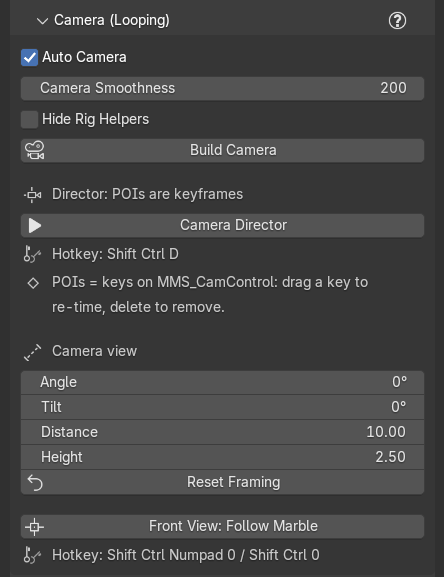
Marble Studio builds a camera that follows the marble smoothly and closes its own loop: the last frame of the camera move flows into the first, just like the marble. You frame the shot with four settings, Angle, Tilt, Distance, and Height, each one value for the whole loop. In Marble Studio Pro you can also fly the camera and drop points of interest, which behave like ordinary keyframes.
Build Camera
Build Camera builds (or rebuilds) the looping camera rig and makes it the scene camera. The rig is a few empties and a camera:
- MMS_Camera: the camera itself.
- MMS_CamControl: the camera control. In Pro, its keyframes are your points of interest.
- MMS_CamTarget, MMS_CamRig, and MMS_CamAim: helpers that do the following and aiming. Leave them alone.
The rig places the camera on every frame from the settings in this section, so moving the camera by hand does not stick: use Angle, Tilt, Distance, and Height instead. You rarely press Build Camera by hand: with Auto Camera on, the camera is rebuilt after every Generate, re-solve, and settle. A press reports "Built looping camera (smoothness 200). POIs are keyframes on MMS_CamControl (now active) -- drag to re-time, delete to remove.", or refuses with "Could not build the camera (need a generated course with a loop note and a baked marble)."
If the rig has a problem that Build Camera cannot fix by itself, a warning icon shows beside the button and the details are in Course Check (see Camera messages).
Auto Camera
Auto Camera (on by default) rebuilds the camera automatically after Generate, re-solves, and settles. Turn it off while you tune the rig by hand; then use Build Camera when you want a rebuild.
Camera Smoothness
Camera Smoothness sets how much the camera ignores individual bounces (200 for a new course, up to 500). Higher follows the broad sweep of the course for a calm, watchable shot; 0 follows the marble's raw path. The loop stays seamless at any value. The value is set at 60 fps and kept the same in seconds at your course's frame rate, so it looks the same at 30, 60, or 120 fps.
The camera keeps its old path until it is rebuilt: after changing Smoothness, press Build Camera (Course Check reminds you with a Camera out of date row).
Recipe: a calmer camera on a jumpy song. Raise Camera Smoothness, press Build Camera, and play.
Hide Rig Helpers
Hide Rig Helpers hides MMS_CamTarget, MMS_CamRig, and MMS_CamAim in the viewport for a clean view. They still drive the camera. The camera control, MMS_CamControl, always stays visible, so its point-of-interest keyframes can always be seen.
Show MIDI Markers
Show MIDI Markers (on by default) lives in Song Reference. It shows the note markers on the timeline. Untick it to declutter the timeline while you work on the camera. Only the MIDI markers are hidden; nothing else is touched.
Points of interest Pro
A point of interest (POI) is one camera framing, stored as a keyframe on MMS_CamControl at the frame where you dropped it. The camera moves smoothly from one POI to the next and back to the first across the loop.
- Re-time a POI by dragging its key in the Timeline or Dope Sheet.
- Remove a POI by deleting its key.
- The camera's loop is closed for you: you don't need to match the last framing to the first.
The section reminds you: "POIs = keys on MMS_CamControl:" / "drag a key to re-time, delete to remove." While POIs drive the camera, a line under Camera view says "The Director's keys are driving the camera; these settings apply only to what it has not keyed."
Marble Studio Free reads only the four Camera view settings and ignores keyframes on the camera control, so a Pro song with POIs plays in Marble Studio Free at one angle.
Camera Director Pro
Camera Director (hotkey Ctrl+Shift+D) lets you fly the camera from the viewport and drop a POI:
| Do this | To |
|---|---|
| Move the mouse left / right | Orbit around the marble |
| Move the mouse up / down | Arc up or over, at the same distance |
| Hold Alt + mouse up / down | Lift the camera straight up or down |
| Mouse wheel | Roll |
| Hold the middle mouse button + mouse up / down | Dolly in or out (sets a new distance) |
| Enter or left-click | Drop a POI at the current frame and exit |
| Esc or right-click | Exit without dropping |
| Space, arrow keys | Play and step, as usual |
The cursor wraps at the edges of the viewport, so you can keep dragging. The status bar lists the controls: "Camera Director: L/R = orbit, up/down = elevation, Alt = Z-lift, wheel = roll, MMB = dolly, Enter/LMB = drop POI + exit, Esc/RMB = exit". A drop reports "POI at frame 540; exited."
Camera view
Four settings frame the camera. Each is one value for the whole loop, so the loop closes at any setting:
- Angle: swings the camera left or right around the marble (−45° to 45°). 0 looks straight at the wall.
- Tilt: tilts the camera up over the marble or down below it, at the same distance (−30° to 45°). A new course starts at −5°.
- Distance: how far in front of the smoothed follow point the camera sits (default 10).
- Height: how far above it the camera sits (default 2.5).
The wall is sized to what the camera sees, so after a big change press Build Wall if Course Check says the wall is out of date.
Recipe: a low, dramatic angle. Set Tilt to a negative value to look up at the course, lower Height, and swing Angle to 20°. Play across the seam: the camera still loops.
Reset Framing
Reset Framing puts Angle, Tilt, Distance, and Height back to their defaults: the default view, looking slightly down, straight on (Tilt −5°). The report says "Camera back to the default view."
In Marble Studio Pro, Reset Framing also clears every POI on MMS_CamControl ("Reset to default framing (cleared all POIs)."). The cleared angles are not thrown away: they are set aside in the file, and a row appears at the top of this section, "Camera angles set aside by Reset Framing", with Bring Back Cleared Angles. Press it to put the whole set back exactly as it was, even after a save and reload.
If Bring Back Cleared Angles cannot put them back, it says why: "There is no camera rig to put the angles back on." (press Build Camera first), "Those camera angles are no longer in this file.", or "Marble Studio could not put 'MMS_CamControl_cleared' back (...)." On success it reports "Restored 6 camera keyframes." If the camera control has no angles but a cleared set is still in the file, the camera row says so: "There are no camera angles on the camera control, but 6 camera keyframes cleared by Reset Framing (MMS_CamControl_cleared) are still in this file. Press 'Bring Back Cleared Angles' in the Marble Studio panel to put them back." (or, for an older cleared set, "Assign it to MMS_CamControl in the dope sheet to put them back.").
Recipe: start the camera over. Press Reset Framing, then set the four values again (or, in Pro, fly new POIs with the Director). Changed your mind in Pro? Bring Back Cleared Angles.
Camera messages
When the camera rig had to be repaired, or something needs your attention, the message is a row in Course Check, under the Camera subject:
- Camera angles lost (red): the camera's POIs are gone. It stays until a camera angle exists again or the rig is removed; a rebuild alone does not clear it.
- Camera repaired and Camera note (plain facts): what the rig fixed by itself.
- Camera out of date (yellow): "Smoothness changed - press Build Camera". Camera Smoothness changed since the camera was built. Press Build Camera.
While a serious camera message stands, a warning icon also shows beside Build Camera.
What the camera rows can say, and what to do:
-
Press Build Camera. The rig could not be rebuilt or posed, or a piece of it was missing and has been made new.
The exact words
"The camera could not be rebuilt on the last edit (...). Nothing was deleted; press Build Camera to try again.", "The camera could not be posed at the current frame (...).", "Marble Studio could not assemble the camera rig this pass."
-
Press Build Wall again after the next edit. The camera rig was incomplete when you built the wall, so the wall was sized from the course alone and may be smaller than a shot needs.
The exact words
"The camera rig is incomplete (MMS_Camera is missing), so the wall was sized from the course alone instead of from what the camera can see -- it may be smaller than a shot needs. Building the wall does not repair the camera; the next edit does. Press Build Wall again afterwards and it will resize."
-
Nothing to do; it is a note. Marble Studio left something of yours alone, or made its own copy.
The exact words
"MMS_CamControl comes from a linked library, so Marble Studio left its animation alone.", "MMS_CamControl is in NLA tweak mode, so Marble Studio made no camera keyframe changes this pass. Leave tweak mode and the camera updates on the next edit.", "The camera angles on MMS_CamControl live in a linked library, so they were left exactly as they are.", "Marble Studio could not work out what else uses the camera angles on MMS_CamControl, so it changed nothing this pass.", "The camera angles on MMS_CamControl were also used by something else in this file, so Marble Studio made MMS_CamControlAction.001 its own copy and edited that. Your other copy (MMS_CamControlAction) is untouched.", "The follow path on MMS_CamTarget was using an action shared with something else in this file. Marble Studio baked a new one and left the old one alone."
-
Nothing to do; the rig put itself right. A piece of the rig was missing, renamed, or out of the scene's reach, and Marble Studio rebuilt or relinked it.
The exact words
A missing piece is named ("The camera aim was missing."), then what was done: "Marble Studio built a new follow target and re-baked the marble path onto it, and re-pointed the boom and the aim at it.", "Marble Studio built a new boom, tied it to the follow target and re-parented the aim to it.", "Marble Studio built a new aim, parented it to the boom, pointed it at the follow target and re-parented the camera to it.", "Marble Studio built a new camera (re-using the saved lens and clipping if they were still in the file) and made it the scene camera again.", or "Marble Studio built a new camera control." A renamed piece: "The camera aim was named 'Aim'; Marble Studio renamed it back to 'MMS_CamAim' so the rest of the add-on can find it again." A piece or collection out of reach: "The 'MMS Camera' collection was in this file but not in the scene you are working in, so the camera built into it would not have been part of this scene. Marble Studio linked it in here as well (it is still in the other scene too).", "The 'MMS Camera' collection was still in this file but no scene could reach it, so nothing inside it would have been saved. Marble Studio linked it back into the scene.", "The camera aim ('MMS_CamAim') was where no scene could reach it -- Blender does not save an object in that state. Marble Studio linked it back into 'MMS Camera'.", "The camera aim ('MMS_CamAim') was in this file but in another scene, so the scene you are working in could not use it. Marble Studio linked it into 'MMS Camera' here as well (it is still in the other scene too).", or "The camera aim ('MMS_CamAim') was outside the 'MMS Camera' collection; Marble Studio linked it back in as well (it is still where you put it too), so nothing can carry it out of the scene." Loose keyframes: "Marble Studio found 6 camera keyframes ('MMS_CamControlAction') that had come loose from the camera control, and put them back on MMS_CamControl." A shared camera: "The camera settings datablock 'MMS_Camera' is also used elsewhere in this file; Marble Studio shared it rather than taking it over."
-
Choose which one you meant. Marble Studio found more than one candidate, or a piece it may not change, and did not guess: it left yours alone.
The exact words
"There are 2 objects tagged as the camera aim (Aim, Aim.001). Marble Studio did not guess between them -- it left all of yours exactly as they are and used a new MMS_CamAim. Their keyframes are untouched.", "There are 2 objects that look like the camera control (Ctrl, Ctrl.001). Marble Studio did not guess between them -- it left both of yours exactly as they are and made a new camera control. Their keyframes are untouched.", "Marble Studio found 2 detached sets of camera angles (AnglesA, AnglesB) and did not guess between them, so it left all of them alone. Assign the one you want to MMS_CamControl in the dope sheet.", "The camera aim ('MMS_CamAim') comes from a linked library, so Marble Studio cannot rename it, tag it or change its animation. The rest of the rig was repaired around it.", or "The camera aim is named 'Aim'. Marble Studio could not rename it back to 'MMS_CamAim' because that name is already taken by something else, so parts of the add-on will not find it." Rename or delete the extra one, then press Build Camera.
-
Reset Framing and Bring Back report what they moved. "Reset Framing cleared 6 camera keyframes and set them aside in this file as MMS_CamControl_cleared. Press 'Bring Back Cleared Angles' in the Marble Studio panel to put them back -- it stays there, and it is still there next time you open the file. You can also assign that action to MMS_CamControl in the dope sheet at any time." and "Put 6 camera keyframes (MMS_CamControl_cleared) back on MMS_CamControl."
A camera row saved in the file from an earlier session ends with when it was written, for example "(from an earlier session, 2026-11-20 14:02)".