Render Loop
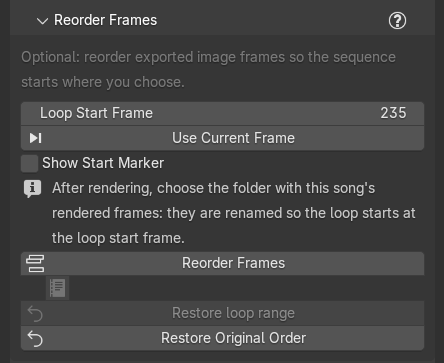
The section's first line says who it is for: "Optional: only for rendering image frames you won't reorder in a video editor." You never need it to make a loop: the render always holds exactly one loop and plays seamlessly on repeat. These tools only matter if you want the loop to start on a different frame and you are not going to move the start in your video editor.
Loop range
Generate sets the scene's frame range to exactly one loop: from note 1 to the frame just before the loop note. Marble Studio keeps it that way when an edit changes the loop's length, and notes it in Course Check as a plain-fact row titled Frame range set, for example:
- "Loop length changed 1210 -> 1214 frames; frame range updated."
- "Frame range set to one loop: 61..1270 (it was 1..1270)."
If you change Frame Start or End yourself, Course Check shows a red row, Range not one loop, for example "Frame range 1..1270 is not one loop (the loop is 61..1270): the render will not loop." Press Restore Loop Range (here, or beside Go To on that row) to put it back ("Frame range 61..1270 (one loop)."). The button is always shown while the file has a loop, and grayed ("The frame range already is one loop.") when there is nothing to restore.
Loop start
Your render always holds exactly one loop, starting at note 1. If a different moment makes a better first frame (for a thumbnail, or a hook on social media), set it here. Rendering is not affected: you render as normal and reorder the frames afterwards.
- Loop Start Frame: the frame you want the loop to start on. It must be a frame of the loop.
- Use Current Frame: makes the frame under the playhead the loop start ("Loop start: frame 300."). Outside the loop it refuses: "The playhead (1300) is outside the loop (61..1270): the loop start must be a frame of the loop. Nothing changed." On the loop's first frame it says "Frame 61 is the loop's own first frame: nothing to reorder."
- Show Start Marker: shows a timeline marker named LOOP START at that frame. Display only; the field is the setting.
Under them, one hint is always shown: "After rendering, choose the folder with this song's rendered frames: they are renamed so the loop starts at the loop start frame."
While the loop start is the loop's first frame, Reorder Frames... is grayed, with the reason "The loop starts at its first frame: the render already is the loop, nothing to reorder." Set any later frame and it un-grays. With no course it says "This file has no loop yet: Generate first.". If the loop later gets shorter than your loop start, the button says "The loop start is outside the loop: set it again." and Course Check shows a yellow row, Loop start outside; set the loop start again.
The marker is told apart from the MIDI markers by its name, LOOP START; Blender's timeline markers have no color setting on any version.
Reorder Frames
Reorder Frames... works once the loop start is not the loop's first frame. After you have rendered the song to
an image sequence, it asks for the folder of rendered frames (the file window says "Choose the folder with" /
"this song's rendered frames.") and renames them in place so the sequence starts at your loop start frame and
wraps round. It also writes loop_audio.wav into the folder: the song's audio, turned to the same start, so it
plays in sync with the frames.
- Files are renamed, not copied: the folder takes no extra disk space. The numbering and name pattern stay the same, so the sequence imports into your editor exactly as before.
- Pressing again is always right. Moved the start five frames later? Set it and press again on the same folder.
- If it is interrupted (a crash, a locked file), the next press finishes the job or puts it back. A small note
file,
marble_studio_loop.json, in the folder records what was done; leave it there.
On success it reports, for example, "The 1210 frames now start at frame 300 and wrap round to frame 299."
It can add "loop_audio.wav written.", "An interrupted reorder was finished first.", "The frame files' dates
changed since the last reorder (a copy, a sync or a re-render); their sizes show the frames are in their original
order." (or "... are turned to start at original frame 300."), or "The old loop_audio.wav was removed: it no
longer matched (this song has no sound strips)." (or "(the song's loop or frame rate differs from these
frames)"). If loop_audio.wav is open in another program at the very end, the frames are done but the audio is
not: "The frames were reordered, but loop_audio.wav could not be replaced because another program has it open
(...). Close it there and press again to finish." or "The frames were reordered, but the old loop_audio.wav no
longer matches them and could not be removed because another program has it open (...). Close it there, then delete
it or press again."
When Reorder Frames refuses
It checks first, then acts: a refusal changes nothing. It shows as a popup, and a red Reorder refused line stays under the button until your next press; its page icon shows the full sentence again. What to do, by reason:
-
Close the frames in your video editor, or make loop_audio.wav writable. The folder or
loop_audio.wavis open in another program, orloop_audio.wavis read-only.The exact words
"The frames folder is in use by another program, likely your video editor. Close the sequence there and press again. Nothing was changed. (Held: frame_0001.png)", "loop_audio.wav is in use by another program, likely your video editor. Close it there and press again. Nothing was changed.", "loop_audio.wav is read-only, so it could not be replaced: clear its read-only setting, then press again. Nothing was changed.", or "loop_audio.wav could not be checked before the move (...). Nothing was changed."
-
Generate the course, set the loop start, and keep the loop range. Nothing to reorder yet, or the frame range was changed by hand.
The exact words
"Choose the folder with this song's rendered frames.", "Generate the course first.", "The loop start is the loop's first frame: the render already is the loop. Nothing was changed.", "The loop start 1300 is outside the loop (61..1270): set it again. Nothing was changed.", or the Range not one loop sentence followed by "Press Restore Loop Range first. Nothing was changed."
-
Wait a few seconds and press again. Blender could not make the song's audio for the folder, or could not read the folder.
The exact words
"The song audio could not be made: Blender's sound mixdown did not finish (no progress after 30 s; it was stopped, or another audio export was running). Nothing was changed. Wait a few seconds and press again." The reason can also be "an old audio file is in the way and could not be deleted (...).", "Blender's sound mixdown could not be asked which settings it takes (...).", "the song audio came back at 44100 Hz, but the scene's audio is set to 48000 Hz", "the song audio came back with 1 channel(s), but the scene's audio is set to 2", "the song audio came back shorter than the loop (20.10 of 20.17 s)", "the song audio came back in a form Marble Studio cannot read (...)", or "the course mixdown is not a 32-bit float WAV". Also "The song audio could not be made (...). Nothing was changed." and "The folder could not be read (...). Nothing was changed."
-
Close the program using the frames, then press again to finish. A rename failed part way.
The exact words
"Could not rename frame_0400.png (Permission denied). The reorder is only part done: close any program using these frames (Premiere, Resolve, a viewer), then press Reorder Frames or Restore Original Order again to finish it." or "The reorder stopped part way (...). Press again to finish it."
-
Choose the folder with exactly this song's loop frames. The folder holds other frames, too few, or none.
The exact words
"This folder holds frames 1..1300, but the loop is 61..1270 (1210 frames)." (with "Missing: 400, 401." or "Not in the loop: 1, 2."; a long list ends "... (12 in all)"), "There are no rendered image frames in this folder.", "This folder holds more than one set of frames (shot_####.png, take2_####.png): keep one song's frames per folder.", "Two files have the same frame number (0061): for example a_0061.png and b_0061.png.", "The folder D:/renders does not exist.", or "This loop starts before frame 0 (at -12): Reorder Frames only works on loops that start at frame 0 or later."
-
Restore the original order first. The song's loop changed since this folder was reordered.
The exact words
"This folder's frames are 300..1509, but the song's loop is now 61..1274. Press Restore Original Order to put them back."
-
If you re-rendered into this folder, delete the old note and press again. The folder's note file and its frames no longer belong together.
The exact words
"The reorder note marble_studio_loop.json in this folder cannot be read (...). If you re-rendered the whole song into this folder, delete marble_studio_loop.json and press again.", "This folder looks reordered (it holds loop_audio.wav) but its note marble_studio_loop.json is missing, so the order of its frames cannot be known. If these are fresh render frames, delete loop_audio.wav and press again. Nothing was changed.", "The reorder note in this folder belongs to a different set of frames (1210 frames from frame_0061.png). If you re-rendered the whole song into this folder, delete marble_studio_loop.json and press again.", "The frames in this folder are not the ones Marble Studio last reordered (their sizes differ), so their order cannot be known. If you re-rendered the whole song into this folder, delete marble_studio_loop.json and press again. Nothing was changed.", or "The frame files' dates changed since the last reorder and the frames are too alike in size to tell their order. Nothing was changed. If you re-rendered the whole song into this folder, delete marble_studio_loop.json and press again; otherwise restore the files' dates (copy the folder back from where it was reordered)."
-
Clear up after an interrupted reorder. A reorder stopped part way and the folder changed since.
The exact words
"An earlier reorder in this folder was interrupted and the folder has changed since (frame_0400.png), so it cannot be finished safely. Nothing was changed." or "This folder holds temporary files from an interrupted reorder that can no longer be finished (frame_0400.png.tmp). Delete those files (and marble_studio_loop.json if you re-rendered the song here), then press again. Nothing was changed."
Recipe: start the loop on a big strike. Open on the hit you want people to see first.
- Scrub to the frame you want first (the Marker buttons in Song Reference hop from strike to strike) and press Use Current Frame.
- Render the animation to an image sequence (PNG or EXR) as usual.
- Press Reorder Frames... and choose the render folder.
- Import the frames and
loop_audio.wavinto your editor. Set the clip to repeat.
Restore Original Order
Restore Original Order asks for a folder that Reorder Frames changed and puts its frames back in render order: "The 1210 frames are in their original render order." A folder Marble Studio never reordered is left as it is: "This folder has no reorder note (marble_studio_loop.json): Marble Studio has not reordered it, so it is already in render order. Nothing was changed." If the song's loop has changed since the reorder, Reorder refuses and points you here first.