Track Materials Pro
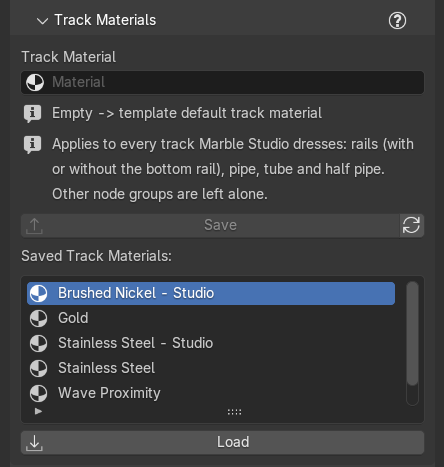
One material for every track in the course. The Track Materials section is folded by default; click its header to open it.
Choose a material
Track Material is the one material every track wears. Pick any material in the file. Empty means the track kit's own default material ("Empty -> template default track material").
With a track selected that wears no material yet, the section says "No material on this track yet: pick a Track Material first."
It applies to every track Marble Studio dresses. The section says so in one line: "Applies to every track Marble Studio dresses: Rails (with or without the bottom rail), Pipe, Tube and Half Pipe. Other node groups are left alone." Tracks dressed with Other node group... are left alone.
Each track carries the material it wears in its own material slot, so clicking a track shows that material in the Shader Editor and in Material Properties. Picking a different material in the track's slot (or dropping one on the track) changes the Track Material for every track, the same as picking it in the Track Material field. Editing the material inside the track's Geometry Nodes modifier is not supported: use the slot or the field.
Directional materials (wood grain, brushed metal from an image). The track's UV runs along the track and around it. If a material's grain wraps the tube in rings instead of running along it, rotate the material 90 degrees with a Mapping node.
A saved track geometry can carry its own material; this field is the default for everything else.
Recipe: brushed steel rails. Make a metallic material in the Shader Editor, then pick it in Track Material. Every track changes at once.
Save to the library
- Save: saves the chosen Track Material to the Marble Studio library, so it is there in every song. Grayed when the field is empty.
- Refresh (the circular-arrow button): re-reads the library folder, for example after you copied files into it.
- Saved Track Materials: the list of saved track materials.
- Load: adds the selected saved material to this file and sets it as the Track Material.
Blender versions
Blender files only travel forward: a material saved from a newer Blender is listed in an older one with its name and "(saved by Blender 5.2 - open it in 5.2)", never an error. Save library items from the oldest Blender you use if you work across versions.